

Best Salesforce Setup for a B2B Sales Team
Building the best Salesforce setup for a B2B sales team requires strategic planning, thoughtful configuration, and alignment with your organisation's unique sales processes. The difference between a mediocre CRM and a revenue-generating powerhouse lies in how you structure your Salesforce environment from day one. Getting the foundation right ensures scalability, drives user adoption, and creates a platform that genuinely supports your sales team's daily activities rather than hindering them.
Essential Components of Your B2B Salesforce Configuration
The foundation of any successful B2B Salesforce implementation begins with understanding your sales cycle and buyer journey. Unlike B2C environments, B2B sales typically involve longer cycles, multiple stakeholders, and complex decision-making processes.
Your initial setup should focus on three core areas: data architecture, automation workflows, and reporting infrastructure. These elements work together to create a cohesive system that tracks every interaction from initial prospect contact through to closed revenue.
Data Architecture and Object Relationships
Configuring the right data structure determines how effectively your team can track relationships and opportunities. Start by establishing clear relationships between Accounts, Contacts, Opportunities, and Leads.
Key considerations for B2B data architecture:
Map your organisational hierarchies accurately to reflect parent-child account relationships
Configure multiple contact roles per opportunity to track all decision-makers
Implement custom objects for tracking proposals, contracts, or technical evaluations
Establish naming conventions and required fields before importing any data

The Sales Cloud setup basics provide essential guidance on configuring these foundational elements correctly from the outset.
Sales Process Automation
Automation transforms the best Salesforce setup for a B2B sales team from a simple database into an intelligent sales assistant. Focus automation efforts on eliminating manual tasks whilst maintaining data quality.
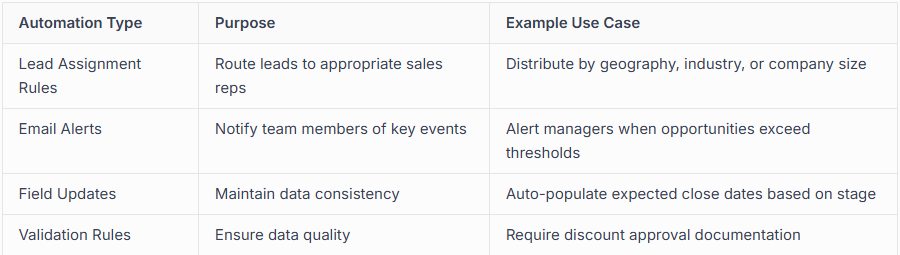
When implementing automation, consider strategic decisions for Salesforce implementation that align with your broader business objectives. Automation should feel invisible to users whilst delivering measurable efficiency gains.
Optimising Lead and Opportunity Management
Lead management in B2B environments demands sophisticated qualification processes. Configure your lead stages to mirror your actual qualification criteria rather than generic templates.
Lead Qualification Framework
Implement a structured approach using custom fields that capture firmographic and behavioural data. Create picklist values that reflect genuine buying signals your team recognises.
The best Salesforce setup for sales teams includes clear conversion paths from Lead to Opportunity. Define what constitutes a qualified lead and automate the conversion process where possible.
Essential lead fields for B2B sales:
Company revenue range
Number of employees
Current solution/competitor
Budget authority
Timeline to purchase
Pain points and requirements
Understanding how to set up Sales Cloud for businesses in your region ensures compliance while maximising functionality.
Opportunity Stage Configuration
Map opportunity stages to your actual sales methodology, not Salesforce defaults. Each stage should represent a meaningful progression in the buyer's journey with specific exit criteria.
Create stage-specific fields that capture required information at each phase. For instance, technical evaluation stages might require competitor comparison data, whilst negotiation stages need approval chains documented.

User Adoption and Interface Customisation
Technology only delivers value when people use it effectively. The best Salesforce setup for a B2B sales team prioritises user experience alongside functionality.
Page Layout Optimisation
Customise page layouts for different user profiles and sales roles. Account executives need quick access to opportunity history, whilst sales managers require forecasting visibility and team performance metrics.
Remove unnecessary fields that clutter interfaces and slow down data entry. Group related fields logically and use sections to create visual hierarchy. Creating teams that drive Salesforce success requires thoughtful attention to how different roles interact with the system.
Mobile Configuration
B2B sales representatives spend significant time outside the office. Configure Salesforce Mobile to provide essential functionality without overwhelming users with desktop complexity.
Enable offline access for critical objects
Customise mobile cards to surface priority information
Configure mobile-specific quick actions for common tasks
Test mobile workflows before rolling out to sales teams
The Salesforce implementation best practices emphasise clean data and user-centric design as foundations for adoption.
Reporting and Dashboards for Sales Leadership
Sales leaders need visibility into pipeline health, forecast accuracy, and team performance. Configure dashboards that answer critical business questions at a glance.
Essential B2B Sales Reports
Create report folders organised by role and use case. Standard reports should include pipeline by stage, win rate analysis, sales cycle duration, and forecast versus actual comparisons.
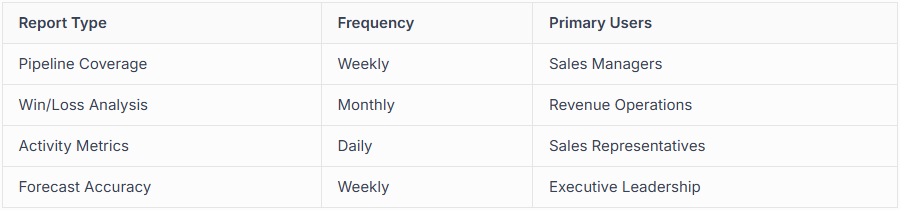
Advanced reporting should leverage cross-object relationships to analyse conversion rates between stages and identify bottlenecks. The best Salesforce apps for B2B teams can enhance native reporting capabilities with specialised analytics.

Integration and Ecosystem Considerations
No CRM operates in isolation. The best Salesforce setup for a B2B sales team integrates seamlessly with marketing automation, communication platforms, and business intelligence tools.
Critical Integration Points
Connect Salesforce to your email system first. Whether using Outlook or Gmail, email integration captures communication history automatically and reduces manual logging. Configure email setup practices according to Salesforce recommendations.
Evaluate your technology stack and prioritise integrations that eliminate duplicate data entry. Marketing automation platforms, document signing services, and telephony systems all deserve consideration during initial setup.
Security and Permission Structure
B2B organisations handle sensitive commercial information. Configure robust security models that protect data whilst enabling collaboration.
Define organisation-wide defaults conservatively, then open access through sharing rules and roles. Use permission sets to grant specialised access without creating numerous profiles. Ensure your AI readiness includes appropriate data governance for emerging capabilities.
Building the best Salesforce setup for a B2B sales team demands expertise in both platform capabilities and sales operations. Success requires balancing powerful functionality with user-friendly design whilst maintaining data quality and security standards. capeMBX partners with organisations to deliver clean, scalable Salesforce implementations using our proven BEACON methodology, ensuring your investment drives measurable business growth from day one.
Frequently Asked Questions
How long does it take to set up Salesforce for a B2B sales team?
A basic setup typically requires 4-8 weeks, though complex organisations with multiple sales processes may need 12-16 weeks for comprehensive implementation including data migration, custom development, and user training.
What's the most common mistake in B2B Salesforce setups?
Over-customisation ranks as the primary mistake. Teams often create excessive custom fields, objects, and automation that complicate the system without delivering proportional value. Start simple and add complexity only when business requirements clearly justify it.
Should we migrate all historical data during initial setup?
Migrate only data that provides ongoing business value. Focus on active accounts, open opportunities, and recent closed deals. Historical data older than 2-3 years typically offers limited practical benefit and complicates migration whilst slowing system performance.
How many custom fields should we create for opportunities?
Limit custom opportunity fields to those directly supporting sales decisions or required for reporting. Most effective B2B setups use 15-25 custom opportunity fields beyond standard Salesforce fields, focusing on qualification criteria, competitive intelligence, and deal-specific requirements.
