

Irish and UK businesses face unique challenges when modernising their sales operations, from managing dispersed teams to navigating evolving data protection requirements. The decision to set up Sales Cloud represents a significant investment in digital transformation, one that requires careful planning and strategic execution.
Salesforce Sales Cloud offers powerful capabilities for automating sales processes, managing customer relationships, and generating actionable insights, but realising these benefits demands more than a simple installation. A good Sales Cloud setup is not about switching on every feature. It is about making the sales team faster, giving leaders a forecast they trust, and replacing scattered spreadsheets with one practical way of working.
For an Irish and/or UK SME, the best first release is usually focused: leads, accounts, contacts, opportunities, activities, pipeline reporting, and a simple process for follow-up and handover. Build the basics well before adding automation, complex dashboards, or custom objects.
Understanding the Irish & UK Business Context
When you set up Sales Cloud, you must account for specific regulatory and operational considerations that differ from other markets. Irish and UK companies operate under GDPR and UK GDPR compliance requirements, as well as the Data Protection Act, which influence how customer data is captured, stored, and processed within Sales Cloud. Additionally, many Irish businesses maintain operations across multiple currencies, particularly those serving both domestic and UK markets following Brexit.
Key considerations include:
Data residency requirements and European hosting preferences
Multi-currency functionality for cross-border transactions
Integration with Irish & UK banking systems and payment processors
VAT and tax calculation compliance for Irish and UK Revenue requirements
The comprehensive approach to CRM implementation requires understanding these nuances from the outset. Businesses that overlook regional requirements often face costly modifications later in the deployment cycle.
Strategic Planning and Requirements Gathering
Before technical configuration begins, successful organisations invest time in mapping their current sales processes and identifying improvement opportunities. This discovery phase proves critical when you set up Sales Cloud, as it prevents the common mistake of replicating inefficient workflows in a new system.
Salesforce's strategic rollout approach emphasises aligning technology implementation with business objectives. Start by documenting your current lead-to-cash process, including all touchpoints, handoffs, and decision points.
Defining Your Sales Model
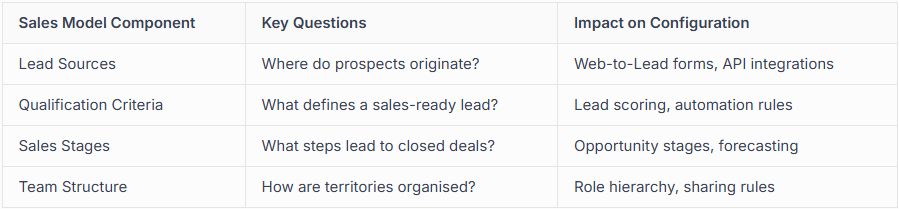
Documenting these elements creates a blueprint for configuration decisions. Choosing the right Salesforce partner in Ireland and the UK becomes easier when you clearly articulate these requirements.
Technical Configuration and Customisation
The technical implementation phase transforms strategic plans into functional systems. When you set up Sales Cloud, core configuration tasks follow a logical sequence that minimises rework and ensures stability.
Essential Configuration Steps
User Management and Security - Establish user roles, profiles, and permission sets that reflect your organisational hierarchy
Data Model Design - Configure standard objects and create custom objects for unique business requirements
Process Automation - Build workflows, validation rules, and approval processes that enforce business logic
Integration Architecture - Connect Sales Cloud with existing systems, including ERP, marketing platforms, and accounting software
Reporting Framework - Design dashboards and reports that provide visibility into key performance metrics
Data Migration and Quality Management

Migrating existing customer data represents one of the most challenging aspects when you set up Sales Cloud. Poor data quality undermines even the most sophisticated configuration, leading to user frustration and diminished adoption.
Data migration best practices:
Conduct thorough data profiling to identify duplicates, incomplete records, and inconsistencies
Establish data governance policies before migration begins
Implement validation rules that prevent future data quality issues
Plan for ongoing data maintenance and enrichment processes
TechRadar's comprehensive CRM review highlights data quality as a critical success factor. Organisations should allocate 30-40% of implementation time to data-related activities, including cleansing, mapping, and validation.
User Adoption and Training Strategies
Technical excellence means nothing if users resist the new system. Irish and UK businesses that successfully set up Sales Cloud recognise that user adoption and change management requires deliberate planning and ongoing support.
Training Approaches
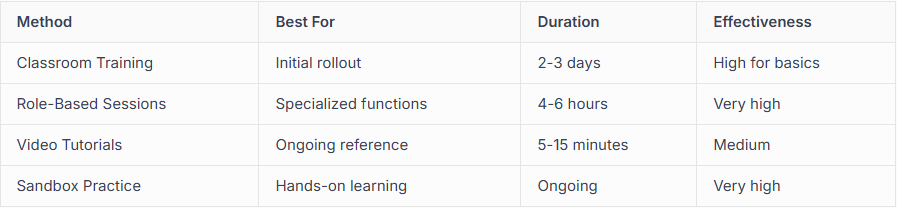
Creating teams that drive Salesforce success involves identifying champions within each department who can support their colleagues and provide feedback for continuous improvement. These super-users bridge the gap between IT and business users.
Testing and Quality Assurance
Comprehensive testing validates that Sales Cloud meets business requirements before users rely on it for daily operations. When you set up Sales Cloud, testing should encompass multiple scenarios and user personas.
Develop test scripts covering typical workflows, edge cases, and integration points. User acceptance testing (UAT) involving actual salespeople identifies usability issues that technical teams might overlook. It’s recommended at least two weeks of structured UAT with documented test cases.

Ongoing Optimisation and Support
Implementation doesn't end at launch. Successful organisations treat their CRM as a living system requiring continuous refinement. Regular reviews identify opportunities for automation, process improvements, and feature adoption.
Post-implementation priorities include:
Monthly usage analytics review to identify underutilized features
Quarterly roadmap planning aligned with business strategy changes
Regular training refreshers and advanced skills development
Proactive system health monitoring and performance optimization
Understanding Salesforce managed services versus in-house support helps organisations determine the right ongoing support model. Many Irish businesses find that partner-led managed services provide expertise and capacity that internal teams cannot match.
Measuring Success and ROI
Establishing clear metrics before implementation enables objective assessment of Sales Cloud's business impact. Track both leading indicators like user adoption rates and lagging indicators such as sales cycle length and win rates.
Kerry Townsend's Sales Cloud implementation handbook emphasises setting measurable objectives during the planning phase. Typical KPIs include pipeline visibility improvement, forecast accuracy, and time saved on administrative tasks.
Organisations that document baseline metrics before they set up Sales Cloud can demonstrate tangible value to stakeholders. This quantitative evidence supports future investment in platform expansion and advanced capabilities like automation in Salesforce.
RECAP: A step-by-step setup plan
Set the business outcomes - Choose the outcomes that matter most. Examples include improving lead response time, raising conversion rates, creating a reliable pipeline forecast, or reducing the time salespeople spend updating records.
Map the sales process - Define how a lead becomes a qualified opportunity, who owns each stage, what information is required, and when a deal is marked won or lost. Keep the first version simple.
Define the data model - Establish the core records you need:
Leads for unqualified prospects
Accounts for companies or customer organisations
Contacts for people
Opportunities for active deals
Products, quotes, and activities where relevant
Set roles, access, and security - Salespeople need to see the right information without exposing sensitive data unnecessarily. Define roles, profiles, permission sets, sharing rules, and approval processes early.
Prepare and migrate data - Remove duplicates, standardise fields, decide which historical records are worth bringing across, and test migration with a small sample first. Do not migrate years of poor-quality data simply because it exists.
Configure the sales workspace - Create page layouts, required fields, opportunity stages, activity guidance, lead assignment rules, and lightweight automation. Aim for fewer clicks, not more fields.
Build useful reports and dashboards - Start with the questions leaders and reps ask every week:
What pipeline is expected this month and quarter?
Which deals have gone quiet?
Where are leads coming from?
What is the conversion rate by stage?
Which reps need support?
Test with real users - Run user acceptance testing with people who sell, manage sales, and support customers. Use realistic scenarios, not idealised test cases.
Train by role and launch in phases - A sales rep, sales manager, finance user, and system administrator do not need the same training. Give each group role-based sessions and short job aids.
Measure adoption after go-live - Track meaningful behaviours: opportunity updates, next steps logged, lead response times, forecast completeness, data quality, and report usage.
Irish & UK SME setup checklist
Named executive sponsor
Sales process agreed by leadership and reps
Data migration plan and data owner
Clear definitions for lead, qualified lead, opportunity, closed won, and closed lost
Security model approved
Core reports agreed before go-live
User training scheduled
Support route for issues and enhancement requests
30-, 60-, and 90-day review dates booked
capeMBX’s implementation approach uses discovery, detailed design, two-week delivery sprints, solution demos, user acceptance testing, training, deployment, and handover. That structure helps prevent a Sales Cloud project becoming a one-off technical build with no adoption plan.
FAQ
How long does Salesforce Sales Cloud take to set up for an SME? A focused initial release can often be delivered in weeks rather than months, but timing depends on data quality, integrations, custom requirements, and internal decision-making.
Do we need to migrate all historical CRM data? Usually not. Prioritise active customers, open opportunities, key contacts, recent activity, and reporting data that has a clear business use.
Should we use Salesforce’s standard opportunity stages? Use them as a starting point. Adapt stages and exit criteria to your own sales process, but avoid creating a long, overly detailed list that salespeople will struggle to maintain.
Successfully implementing Sales Cloud transforms how Irish and UK businesses engage customers, manage pipelines, and drive revenue growth. However, realising these benefits requires expert guidance throughout planning, configuration, testing, and adoption phases.
capeMBX Consulting brings specialised expertise in Salesforce implementations for UKI businesses, employing our proven BEACON methodology to ensure your Sales Cloud deployment delivers sustainable success. Our team works alongside your stakeholders to build clean, scalable solutions that drive measurable results and competitive advantages.
